


The worldwide KNX Engine node package
KNX protocol implementation for Node.js. It supports KNX/IP Tunneling/Routing, KNX/IP Secure and Data Secure, and FT1.2/KBerry TP — both plain KNX and the full secure KNX stack. This is the official engine of Node-Red’s node node-red-contrib-knx-ultimate






npm i knxultimate

 Authorized KNX logo by KNX Association*
Features
- KNX/IP Tunnelling over UDP and TCP (plain or secure)
- KNX/IP Routing over multicast (plain and secure), with ROUTING_BUSY flow control
- KNX/IP Secure full stack (session handshake + Secure Wrapper)
- KNX Data Secure — per-GA end-to-end encryption via ETS keyring
- KNX TP serial FT1.2 / KBerry / BAOS, with Data Secure on TP
- Datapoint (DPT) encoding/decoding for a massive number of datapoints
- Discovery of interfaces/routers (multicast + unicast)
- Winston-based log stream you can intercept programmatically
Requirements
- Node.js 18+
- For KNX Secure / Data Secure: an ETS keyring (
.knxkeys) file and its password, or the manual tunnel credentials (plusgroupKeysfor Data Secure) - For TP serial (FT1.2/KBerry): a supported serial interface (the
serialportdependency is used under the hood)
Table of Contents
- Connection setup
- Supported datapoints
- Methods / properties
- Events
- Log stream
- Plain KNX: quick examples
- KNX/IP Secure: quick examples
- Decoding telegrams from the bus
- Examples folder
- Using kBerry on Raspberry Pi (UART / FT1.2)
- How to collaborate
- License
- Support this project
CHANGELOG
| Technology | Supported |
|---|---|
| KNX IP Full Stack | |
| KNX IP Secure Full stack | |
| KNX TP Serial FT1.2/KBERRY/BAOS | |
| KNX TP Secure Full stack |
Please subscribe to my channel, to learn how to use it
SUPPORT THIS PROJECT
KNXUltimate is developed and maintained in my free time, and I also cover infrastructure, devices, test setup, and development costs to keep it available for everyone.
If this project saves you time, helps your work, or is part of your installation, please consider supporting it with a PayPal donation.
Even a small donation makes a real difference and helps keep the project alive, maintained, and free for the whole community.

CONNECTION SETUP
If you are starting out, you usually need only a few properties.
Start from one of these 4 cases:
| Use case | Minimum config |
|---|---|
| Plain tunnelling over UDP | hostProtocol: 'TunnelUDP', ipAddr, ipPort |
| Plain routing over multicast | hostProtocol: 'Multicast', ipAddr: '224.0.23.12', ipPort: 3671, physAddr |
| KNX/IP Secure over TCP | hostProtocol: 'TunnelTCP', ipAddr, ipPort, isSecureKNXEnabled: true, secureTunnelConfig |
| Plain tunnelling over TCP | hostProtocol: 'TunnelTCP', ipAddr, ipPort, isSecureKNXEnabled: false |
| Direct KNX TP serial (FT1.2 / KBerry / BAOS) | hostProtocol: 'SerialFT12', serialInterface, physAddr |
If you’re unsure, start with TunnelUDP.
Smallest possible starting point:
import { KNXClient } from 'knxultimate'

const client = new KNXClient({
  hostProtocol: 'TunnelUDP',
  ipAddr: '192.168.1.117',
  ipPort: 3671,
})

client.Connect()
Core properties
These are the properties most people will touch first:
| Property | Applies to | Description |
|---|---|---|
hostProtocol (string) |
all | One of: "TunnelUDP" (plain tunnelling via UDP), "Multicast" (plain routing via multicast 224.0.23.12), "TunnelTCP" (tunnelling over TCP: KNX/IP Secure with isSecureKNXEnabled: true, plain otherwise), "SerialFT12" (direct TP/FT1.2 serial interface such as /dev/ttyAMA0). |
ipAddr (string) |
IP transports | KNX/IP peer address. Use "224.0.23.12" for routing (multicast), or the interface/router IP for tunnelling. |
ipPort (number/string) |
IP transports | KNX/IP port. Default 3671. |
physAddr (string) |
multicast, serial, optional elsewhere | Source IA on bus (for example "1.1.200"). Multicast: required. TunnelUDP: used as cEMI source. TunnelTCP secure: ignored as bus source, because the gateway assigns the tunnel IA. |
loglevel (string) |
all | One of: disable, error, warn, info, debug, trace. |
Usually optional
You can ignore this section until you actually need one of these behaviors.
| Property | Applies to | Description |
|---|---|---|
localIPAddress (string) |
TunnelUDP, Multicast | Local IPv4 address for UDP tunnel binding and multicast interface selection. Takes precedence over interface for local address selection; leave blank to select automatically. |
interface (string) |
IP transports | Local interface name to select the NIC. When localIPAddress is blank, uses the first non-internal IPv4 address reported for this interface. |
autoReconnect (bool) |
all | After the first Connect(), reconnect indefinitely every 5 seconds following an unexpected disconnection or failed connection attempt. An explicit Disconnect() stops retrying. Default false. |
suppress_ack_ldatareq (bool) |
Multicast, TunnelUDP, serial | Bus ACK. true clears the ACK request bit in the telegrams sent to the bus (cEMI L_Data.req), so the receiving devices are not asked to acknowledge them. TunnelTCP never sets this bit. In TunnelUDP, while waitForTunnelingAck is unset, true also stops waiting for the interface’s TUNNELLING_ACK (legacy behaviour). Set true only if your interface needs it. Default false. |
waitForTunnelingAck (bool) |
TunnelUDP | Interface ACK. true waits for the interface to confirm each telegram with a TUNNELLING_ACK: a telegram that is not confirmed is sent once more, then the connection is closed (ISO 22510 §5.4.2.6). false never waits. Unset: waits only when suppress_ack_ldatareq is false, as in previous versions. eibPORT and Loxone gateways need suppress_ack_ldatareq: true together with waitForTunnelingAck: true. |
theGatewayIsKNXVirtual (bool) |
tunnelling | Special handling for ETS KNX Virtual (adds localIPAddress to the tunnel endpoint). Default false. |
If an interface has multiple IPv4 addresses (for example, a host address plus a VRRP/keepalived VIP), later addresses no longer replace its first suitable IPv4. Node.js does not expose primary/secondary or VRRP flags, so automatic selection still depends on the order reported by the OS. For UDP tunnelling with a fixed host address, set localIPAddress: '192.168.178.252' in the KNXClient options to select that address regardless of ordering. The address must be assigned locally. TCP socket source selection follows the OS routing table.
Queue pacing
You can ignore this unless you want to tune send pacing.
| Property | Applies to | Description |
|---|---|---|
KNXQueueSendIntervalMilliseconds (number) |
all | Inter-telegram delay in ms. Default about 25. Don’t go below 20. In TunnelUDP, ACKs, heartbeats and disconnect packets are sent immediately and do not affect application telegram spacing. In Multicast, a ROUTING_BUSY adds a pause on top of this delay (see Routing specifics). |
strictDatapoints (bool) |
all | write/respond throw for values outside the datapoint’s range or of the wrong type, instead of clamping or truncating them (see Strict datapoints). Default false. |
Secure options
Read this only if you are using KNX Secure.
| Property | Applies to | Description |
|---|---|---|
isSecureKNXEnabled (bool) |
IP secure, serial Data Secure | Enable KNX/IP Secure. With TunnelTCP: session handshake + Secure Wrapper. With Multicast: secure routing (Secure Wrapper, timer sync). With SerialFT12: enable KNX Data Secure on TP (group keys only, no IP wrapper). |
secureTunnelConfig (object) |
secure tunnelling, routing, serial | KNX Secure configuration. For TunnelTCP/routing it drives both tunnel auth and Data Secure; for SerialFT12 only the keyring fields (knxkeys_file_path or knxkeys_buffer, plus knxkeys_password) are used to load group keys for Data Secure on TP. |
secureRoutingWaitForTimer (bool) |
secure routing (multicast) | Wait for first timer sync (0955 / 0950) before sending. Default true. |
Serial FT1.2 options
Read this only if you are using hostProtocol: 'SerialFT12'.
| Property | Applies to | Description |
|---|---|---|
serialInterface (object) |
SerialFT12 | Serial port settings used when hostProtocol === 'SerialFT12'. Supports path (default /dev/ttyAMA0), baudRate (default 19200), dataBits, stopBits, parity ('even' by default), rtscts, dtr, timeoutMs, lock (forwarded to serialport), and isKBERRY (default true, enable Weinzierl KBerry/BAOS initialisation). |
Serial FT1.2 (TP) mode / KBerry (see below how to setup the RPi and KBERRY)
Choose hostProtocol: 'SerialFT12' to connect directly to KNX TP via a serial FT1.2 interface. This mode is primarily designed and tested for Weinzierl KBerry / BAOS modules running in Link Layer (cEMI) mode over FT1.2. Configure the serial line via the serialInterface option; by default /dev/ttyAMA0, 19200 baud, 8E1, DTR on, RTS/CTS off are used.
This transport supports KNX Data Secure on TP: set isSecureKNXEnabled: true and provide an ETS keyring via secureTunnelConfig.knxkeys_file_path (or secureTunnelConfig.knxkeys_buffer) plus secureTunnelConfig.knxkeys_password. Verified with Weinzierl KBerry / BAOS modules; leave serialInterface.isKBERRY at its default true to run their FT1.2 init sequence automatically.
List all available serial devices before connecting:
import { KNXClient } from 'knxultimate'

async function connectSerial() {
  const ports = await KNXClient.listSerialInterfaces()
  ports.forEach((p) => console.log('Serial port:', p.path))

  const client = new KNXClient({
    hostProtocol: 'SerialFT12',
    serialInterface: {
      path: '/dev/ttyAMA0',
      baudRate: 19200,
      dataBits: 8,
      stopBits: 1,
      parity: 'even',
      // KBerry / BAOS helpers:
      isKBERRY: true,   // default
      lock: false,      // optional, useful on macOS
    },
    physAddr: '15.15.255', // source IA on the bus
    loglevel: 'info',
    // Optional: enable KNX Data Secure on TP using an ETS keyring
    isSecureKNXEnabled: true,
    secureTunnelConfig: {
      knxkeys_file_path: '/path/to/Project.knxkeys',
      // Alternatively: knxkeys_buffer: fs.readFileSync('/path/to/Project.knxkeys'),
      knxkeys_password: 'your-ets-password',
      // tunnel* fields are ignored in SerialFT12 mode (no IP tunnel auth); only group keys are used.
    },
  })

  client.on('connected', () => console.log('Serial FT1.2 ready'))
  client.on('indication', (packet) => console.log('Telegram:', packet))
  client.Connect()
}
Remember to configure the physical address (physAddr) that ETS assigns to your TP interface; the serial transport uses that IA on the bus. In KBerry mode (isKBERRY: true) the driver automatically:
- Sends an FT1.2 reset
- Switches the BAOS communication mode to Link Layer (
cEMI) - Enables indication sending
- Sets the Address Table length to 0 (no GA filter, all group telegrams are forwarded)
- If
isSecureKNXEnabled: trueand an ETS keyring is configured insecureTunnelConfig, loads group keys and applies KNX Data Secure on TP for those Group Addresses (cEMIL_Data.req/L_Data.indare encrypted/decrypted end-to-end). No IP Secure wrapper is used on the serial line; only the APDU is protected.
SUPPORTED DATAPOINTS
For each Datapoint, there is a sample on how to format the payload (telegram) to be passed.
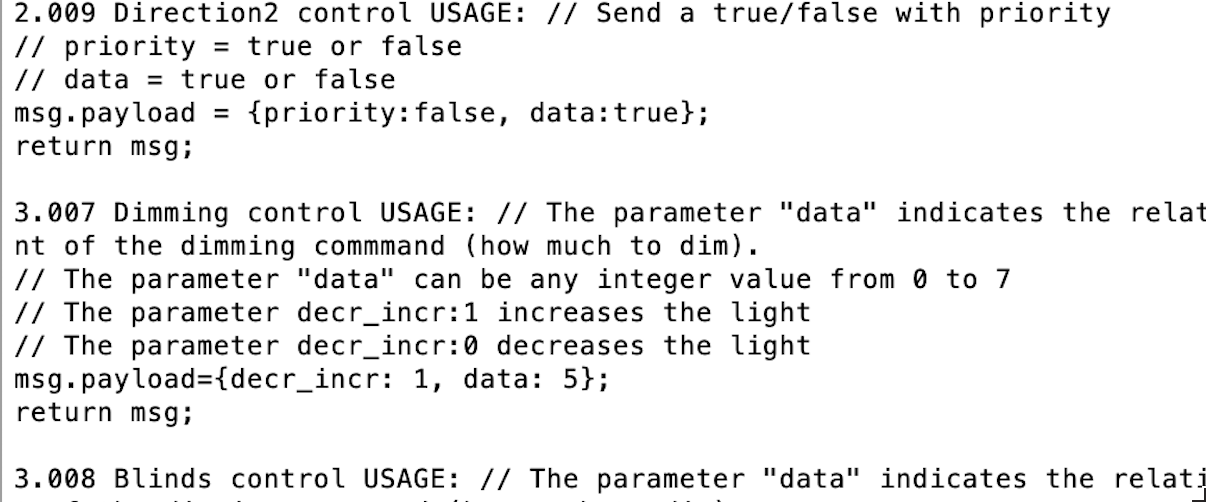
For example, pass a true for datapoint “1.001”, or { red: 125, green: 0, blue: 0 } for datapoint “232.600”.
It support a massive number of Datapoints. Please run the examples/showDatapoints.ts file to view all datapoints in the output console.
Be aware, that the descriptions you’ll see, are taken from Node-Red KNX-Ultimate node, so there is more code than you need here. Please take only the msg.payload part in consideration.
You should see something like this in the console window (the msg.payload is what you need to pass as payload):
METHODS/PROPERTIES OF KNXULTIMATE
| Method | Description |
|---|---|
| .Connect() | Connects to the KNX Gateway |
| .Disconnect() | Gracefully disconnects from the KNX Gateway |
| .write (GA, payload, datapoint) | Sends a WRITE telegram to the BUS. GA is the group address (for example “0/0/1”), payload is the value you want to send (for example true), datapoint is a string representing the datapoint (for example “5.001”) |
| .writeRaw (GA, payload, bitlength) | Sends a WRITE telegram to the BUS. GA is the group address (for example “0/0/1”), payload is the raw buffer you want to send, bitlength is the payload length in bits (used especially for payloads <= 6 bits) |
| .respond (GA, payload, datapoint) | Sends a RESPONSE telegram to the BUS. GA is the group address (for example “0/0/1”), payload is the value you want to send (for example true), datapoint is a string representing the datapoint (for example “5.001”) |
| .respondRaw (GA, payload, bitlength) | Sends a RESPONSE telegram to the BUS. GA is the group address (for example “0/0/1”), payload is the raw buffer you want to send, bitlength is the payload length in bits (used especially for payloads <= 6 bits) |
| .read (GA) | Sends a READ telegram to the BUS. GA is the group address (for example “0/0/1”). |
| .discover() | Sends a discover request on the KNX default multicast port and returns the results as an array. This is an async method. See the example in the examples folder |
| .getGatewayDescription() | Sends a gateway description request. It works after an established connection. The async results will be sent to the descriptionResponse event. There is an example in the examples folder named gatewaydescription.ts . |
| .checkConnection() | Sends a CONNECTIONSTATE_REQUEST now and restarts the heartbeat cycle from that moment (tunnelling only). The answer is handled like a normal heartbeat: if the gateway refuses the channel, or does not answer after the usual retries, the client disconnects and, with autoReconnect, reconnects. Useful right after a known network interruption (for example a VPN restart). Returns false and does nothing if not connected. |
| .getCurrentItemHandledByTheQueue() | Returns the sequence number awaiting a tunnelling ACK, or undefined when none is pending. Retained for compatibility with Node-RED queue diagnostics; calling it does not change the queue or ACK state. |
.write, .writeRaw, .respond, .respondRaw and .read return a Promise for the outcome of the telegram, which you can await or ignore. See Telegram outcome.
writeRaw notes
writeRaw(GA, payloadBuffer, bitlength) sends a GroupValue_Write with a raw APDU payload.
- Use
bitlength <= 6for “6-bit” payloads (the value is encoded into the low APCI bits, sopayloadBuffershould be 1 byte and<= 0x3f). - For normal datapoints, you can build
(payloadBuffer, bitlength)withdptlib.populateAPDU(...)and pass them towriteRaw. - See
examples/writeRaw.ts.
respondRaw notes
respondRaw(GA, payloadBuffer, bitlength) sends a GroupValue_Response with a raw APDU payload.
- Payload rules are the same as
writeRaw(includingbitlength <= 6handling). - See
examples/respondRaw.ts.
| Property | Description |
|---|---|
| .isConnected() | Returns true if you the client is connected to the KNX Gateway Router/Interface, false if not connected. |
| .clearToSend | true if you can send a telegram, false if the client is still waiting for the last telegram’s ACK or whenever the client cannot temporary send the telegram. In tunneling mode, you could also refer to the event KNXClientEvents.ackReceived, that is fired everytime a telegram has been succesfully acknowledge or not acknowledge. See the sample.js file. It stays true during a ROUTING_BUSY pause: telegrams are accepted and wait in the queue. |
| .channelID | The actual Channel ID. Only defined after a successfull connection |
Telegram outcome
write(), respond(), read() and their raw variants queue the telegram and return a Promise for what happens to it. You can ignore it, as before: a failure then goes unnoticed and never becomes an unhandled rejection. To know the outcome, await it:
try {
  await client.write('1/0/1', true, '1.001')
} catch (error) {
  // Not connected, invalid value, or the telegram didn't reach the bus
}| Transport | Resolves | Rejects |
|---|---|---|
TunnelUDP |
On the positive L_Data.con | ConfirmationError on a negative L_Data.con. RequestTimeoutError when the TUNNELLING_ACK is still missing after the retry, or when no L_Data.con arrives within 3 seconds. |
TunnelTCP |
On the positive L_Data.con | ConfirmationError on a negative L_Data.con. RequestTimeoutError when no L_Data.con arrives within 3 seconds. |
Multicast |
When the frame has been sent, after any ROUTING_BUSY pause. Routing has no acknowledgement, so this doesn’t prove that anyone received it. | If the frame can’t be sent |
SerialFT12 |
When the module has acknowledged the FT1.2 frame | If the frame can’t be sent |
With waitForTunnelingAck off (or unset together with suppress_ack_ldatareq: true) the TUNNELLING_ACK is not awaited, so only the L_Data.con counts. An interface that doesn’t send L_Data.con at all makes every awaited telegram reject with RequestTimeoutError, even though it went out: the connection isn’t affected, and callers that ignore the Promise notice nothing.
Over a secure tunnel, some gateways (for example Apricum) send L_Data.con outside the Secure Wrapper. It’s accepted as described in KNX IP Secure, and it only settles the Promise of the matching telegram.
All of them also reject if the connection drops first. These methods still throw straight away if the client isn’t connected or the value is invalid, so with .catch() instead of await you need a try/catch as well. Errors can be told apart by error.name. A failed telegram still follows the usual path, so a missing TUNNELLING_ACK closes the tunnel and emits error and disconnected as well.
EVENTS
List of events raised by KNXultimate, in proper order. For the signatures, please see the examples folder.
| Event | Description |
|---|---|
| connecting | KNXUltimate is connecting to the KNX/IP Gateway. Please wait for the connected event to start sending KNX telegrams. |
| connected | KNXUltimate has successfully connected with the KNX/IP Gateway. |
| indication | KNXUltimate has received a KNX telegram, that’s available in the datagram variable. Please see the examples. |
| ackReceived | Reports (packet, success) for a tunnelling request. success is true after a matching successful gateway ACK, or false after two retries without a successful ACK. On retry exhaustion, TunnelUDP closes the tunnel and emits error and disconnected; autoReconnect reconnects when enabled. |
| disconnected | The KNX connection has been disconnected. |
| close | The main KNXUltimate socket has been closed. |
| error | KNXUltimate has raised an error. The error description is provided as well. ROUTING_BUSY and ROUTING_LOST_MESSAGE are notifications: the connection stays up and, on ROUTING_BUSY, routing telegrams wait in the queue for the requested time. |
| descriptionResponse | Gather the getGatewayDescription responses. There is an example in the examples folder named gatewaydescription.ts . |
LOG STREAM
KNXUltimate logging is managed by Winston logger. In case you want to intercept library logs you can use our logStream exported from default entrypoint. Example:
import { logStream } from 'knxultimate'

logStream.on('data', (log) => {
    // handle log
    if(log.level === 'ERROR')
        console.log(`${log.timestamp} ${log.message}`)
})
Log lines are passed to logStream only while something is reading it (on('data'), pipe() or async iteration): lines logged before you attach are not kept. To keep memory bounded, the stream holds at most LOG_STREAM_MAX_BUFFERED (1000) unread entries; if your reader stops consuming (e.g. a paused stream), newer lines are dropped until it catches up.
| Field | Description |
|---|---|
| timestamp | ISO formatted date (YYYY-MM-DD HH:mm:ss.SSS) |
| level | Log level in uppercase (ERROR, WARN, INFO, DEBUG) |
| label | Module name in uppercase (specified when creating logger) |
| message | Log message content |
| stack | Error stack trace (only present for errors) |
Plain KNX: Quick Examples
Below are short, progressively richer examples to connect in plain (non-secure) KNX and listen or interact with the bus. Copy/paste inline; no extra files are created.
1) Minimal tunnelling (UDP) listener
import { KNXClient } from 'knxultimate'

const client = new KNXClient({
  hostProtocol: 'TunnelUDP',
  ipAddr: '192.168.1.117',  // your KNX/IP interface IP
  ipPort: 3671,
  loglevel: 'info',
})

client.on('connected', () => console.log('✓ Plain tunnelling connected'))
client.on('error', (e) => console.error('Error:', e.message))
client.on('disconnected', (reason) => console.log('Disconnected:', reason))

client.on('indication', (packet) => {
  const cemi = packet?.cEMIMessage
  if (!cemi) return
  const src = cemi.srcAddress?.toString?.()
  const dst = cemi.dstAddress?.toString?.()
  const isWrite = cemi.npdu?.isGroupWrite
  const isResp = cemi.npdu?.isGroupResponse
  const raw: Buffer | undefined = cemi.npdu?.dataValue
  console.log('indication', { src, dst, isWrite, isResp, raw: raw?.toString('hex') })
})

client.Connect()
2) Decode a boolean datapoint (1.001)
import { KNXClient, KNXClientEvents } from 'knxultimate'
import { dptlib } from 'knxultimate'

const client = new KNXClient({ hostProtocol: 'TunnelUDP', ipAddr: '192.168.1.117', ipPort: 3671 })

client.on(KNXClientEvents.indication, (packet) => {
  const cemi = packet?.cEMIMessage
  if (!cemi?.npdu) return
  const dst = cemi.dstAddress?.toString?.()
  const raw: Buffer | undefined = cemi.npdu?.dataValue
  if (!dst || !raw) return
  if (dst === '0/1/25') { // for example: a status GA known to be 1.001
    const cfg = dptlib.resolve('1.001')
    const value = dptlib.fromBuffer(raw, cfg)
    console.log(`dst=${dst} ->`, value)
  }
})

client.Connect()
3) Plain routing (Multicast) listener
import { KNXClient } from 'knxultimate'

const client = new KNXClient({
  hostProtocol: 'Multicast',
  ipAddr: '224.0.23.12',
  ipPort: 3671,
  physAddr: '1.1.200',   // set your device IA for routing
  loglevel: 'info',
})

client.on('connected', () => console.log('✓ Plain multicast ready'))
client.on('error', (e) => console.error('Error:', e.message))
client.on('indication', (packet) => {
  const cemi = packet?.cEMIMessage
  if (!cemi?.npdu) return
  const dst = cemi.dstAddress?.toString?.()
  const raw: Buffer | undefined = cemi.npdu?.dataValue
  console.log('routing ind', { dst, raw: raw?.toString('hex') })
})

client.Connect()
4) Write and then READ a status (plain)
import { KNXClient } from 'knxultimate'
import { dptlib } from 'knxultimate'

const client = new KNXClient({ hostProtocol: 'TunnelUDP', ipAddr: '192.168.1.117', ipPort: 3671 })

function waitForStatus(ga: string, timeoutMs = 3000): Promise<number> {
  return new Promise((resolve, reject) => {
    const t = setTimeout(() => { client.off('indication', onInd); reject(new Error('Timeout')) }, timeoutMs)
    const onInd = (packet: any) => {
      const cemi = packet?.cEMIMessage
      if (!cemi || cemi.dstAddress?.toString?.() !== ga) return
      const npdu = cemi.npdu
      if (!(npdu?.isGroupResponse || npdu?.isGroupWrite)) return
      const raw: Buffer = npdu?.dataValue ?? Buffer.alloc(1, 0)
      const bit = (raw.readUInt8(0) ?? 0) & 0x01
      clearTimeout(t)
      client.off('indication', onInd)
      resolve(bit)
    }
    client.on('indication', onInd)
  })
}

async function main() {
  client.Connect()
  await new Promise<void>((res) => client.once('connected', () => res()))
  // Write ON
  client.write('0/1/1', true, '1.001')
  // Read status
  client.read('0/1/25')
  const val = await waitForStatus('0/1/25', 3000)
  console.log('Status:', val ? 'ON' : 'OFF')
}

main().catch(console.error)
KNX/IP Secure: Quick Examples
Below are progressively richer examples to connect to a KNX/IP Secure gateway and listen for telegrams with decrypted payloads. These are meant to be copy-pasted inline (no files are added under examples/). All snippets assume TypeScript/Node 18+.
Important notes
- The client emits the full datagram on
indication, and itscEMIMessageis already plain (decrypted) when keys are available in your ETS keyring. - Never commit the
.knxkeysfile of a real installation. Keep its path/password in environment variables or local config. The test keyring below is the only exception: it’s public on purpose. - Alternative to
knxkeys_file_path: pass the raw keyring bytes viasecureTunnelConfig.knxkeys_buffer(still requiresknxkeys_password). - Secure TCP tunnel auto-select: if
secureTunnelConfig.tunnelInterfaceIndividualAddressis omitted or empty, the client tries all interfaces found in the ETS keyring until authentication and connect succeed, then proceeds and keeps the tunnel open. The chosen IA is exposed onclient._options.secureTunnelConfig.tunnelInterfaceIndividualAddressafter connect.
Test keyring
To try KNX Secure without creating your own project, import this keyring into your KNX gateway:
| File | examples/Secure Test.knxkeys |
| Password | passwordprogetto |
| Gateway | Individual address 1.1.0 |
| Secure tunnels | 1.1.252, 1.1.253, 1.1.254, 1.1.255 |
| Data Secure group addresses | 1/1/1 (command), 1/1/2 (status) |
| Other device | 1.1.1 |
secureTunnelConfig: {
  knxkeys_file_path: 'examples/Secure Test.knxkeys',
  knxkeys_password: 'passwordprogetto',
}
Test use only. This file and its password are public, so anyone can read its keys. Never use it on a real installation.
1) Minimal secure tunnelling (TCP) listener
import { KNXClient, SecureConfig } from 'knxultimate'

// 1) Configure ETS keyring + the interface IA used in your project
const secureCfg: SecureConfig = {
  // tunnelInterfaceIndividualAddress: '1.1.254',   // Optional: omit to auto-select a free tunnel
  knxkeys_file_path: process.env.KNX_KEYS_PATH || '/path/to/Project.knxkeys',
  knxkeys_password: process.env.KNX_KEYS_PASSWORD || 'your-ets-password',
}

// 2) Create a KNX/IP Secure TCP client
const client = new KNXClient({
  hostProtocol: 'TunnelTCP',
  ipAddr: '192.168.1.11',
  ipPort: 3671,
  isSecureKNXEnabled: true,
  secureTunnelConfig: secureCfg,
  loglevel: 'info',
})

client.on('connected', () => console.log('✓ Secure tunnel connected'))
client.on('error', (e) => console.error('Error:', e.message))
client.on('disconnected', (reason) => console.log('Disconnected:', reason))

// 3) Listen: cEMI payload is already decrypted when Data Secure is used
client.on('indication', (packet) => {
  const cemi = packet?.cEMIMessage
  if (!cemi) return
  const dst = cemi.dstAddress?.toString?.()
  const src = cemi.srcAddress?.toString?.()
  const isWrite = cemi.npdu?.isGroupWrite
  const isResp = cemi.npdu?.isGroupResponse
  const raw: Buffer | undefined = cemi.npdu?.dataValue
  console.log('indication', { src, dst, isWrite, isResp, raw: raw?.toString('hex') })
})

async function main() {
  client.Connect()
  await new Promise<void>((res) => client.once('connected', () => res()))
  console.log('Listening… Press Ctrl+C to exit')
}

main().catch(console.error)
1b) Secure tunnelling with only tunnel password
When you do not have access to the ETS keyring you can still negotiate KNX/IP Secure by providing the tunnel IA and password directly. This gives you encrypted tunnelling, while Data Secure and secure multicast stay disabled. 2 is the standard KNX Secure tunnel account and a common default, but ETS assigns a dedicated tunnelUserId per interface, so always verify yours in ETS and set it explicitly (see the note below).
import { KNXClient, SecureConfig } from 'knxultimate'

const tunnelPassword = process.env.KNX_TUNNEL_PASSWORD
if (!tunnelPassword) {
  throw new Error('Set KNX_TUNNEL_PASSWORD with your secure tunnel password')
}

const secureCfg: SecureConfig = {
  tunnelInterfaceIndividualAddress: '1.1.254',
  tunnelUserPassword: tunnelPassword,
  tunnelUserId: 2, // Replace with your tunnel user ID from ETS (number or numeric string)
}

const client = new KNXClient({
  hostProtocol: 'TunnelTCP',
  ipAddr: '192.168.1.11',
  ipPort: 3671,
  isSecureKNXEnabled: true,
  secureTunnelConfig: secureCfg,
})

client.on('connected', () => console.log('✓ Secure tunnel connected (manual password)'))
client.on('error', (e) => console.error('Error:', e.message))

client.Connect()
Note: ETS assigns a dedicated
tunnelUserIdto each secure tunnel. SetsecureTunnelConfig.tunnelUserId(number or numeric string) together with the password, otherwise the gateway replies withSecure Session Status = 1and the connection is closed.
Secure workflow recap
- KNX IP Tunnelling Secure protects the TCP channel. The gateway authenticates a tunnel user by ID + password during the
Secure Session Authenticate (0x0953)step. Provide the password either from the keyring (secureTunnelConfig.knxkeys_*) or manually viasecureTunnelConfig.tunnelUserPassword; in both cases thetunnelUserIdmust match the ETS commissioning data. - KNX Data Secure protects group-address telegrams. It relies on group keys, taken from the ETS keyring or passed directly with
secureTunnelConfig.groupKeys(see below). - Supported combinations
- Keyring only: set
knxkeys_file_path(orknxkeys_buffer) +knxkeys_passwordand omittunnelUserPassword. Both the tunnel password and the group keys are loaded from the keyring.
- Keyring only: set
- Manual tunnel password only: set both
tunnelUserPasswordandtunnelUserIdwithout a keyring. The IP channel is secured; Data Secure works only for the group addresses listed insecureTunnelConfig.groupKeys.- Keyring + manual password: provide the keyring for Data Secure and override the tunnelling password with
tunnelUserPassword(useful when the ETS export does not include the tunnel password). Ensureknxkeys_*andtunnelUserPasswordare both configured.
- Keyring + manual password: provide the keyring for Data Secure and override the tunnelling password with
- To retrieve the tunnel user ID/password pair, open the secure tunnelling interface in ETS (or inspect the
.knxkeysentry). Default ETS IDs are typically small integers (e.g.2,3, …) but may differ per installation.
Additional secure options
Option (secureTunnelConfig.*) |
Default | Description |
|---|---|---|
knxkeys_validate_signature |
true |
Verify the ETS keyring signature (as XKNX). A keyring without a signature is rejected unless this is false; set it only for keyrings that were not exported by ETS. |
groupKeys |
– | Data Secure group keys as { "1/2/3": key }, where the key is a 16-byte Buffer, a 32-character hex string, or a base64 string that decodes to 16 bytes. Works with or without a keyring; on conflict these keys win over the keyring ones. |
requireDeviceAuthentication |
false |
Refuse the TunnelTCP handshake when no device authentication code is available (keyring or deviceAuthenticationPassword). Without the code the gateway is not authenticated, so a forged gateway would be accepted. |
strictSecurity |
false |
Stricter receive checks: drop plain telegrams sent to a group address that has a Data Secure key; when the keyring has a sender list for a group address, drop Data Secure telegrams from senders outside that list; with secure routing, drop frames whose timer is older than the backbone latency tolerance. |
Keyring loading checks the ETS keyring signature, as XKNX does: a wrong knxkeys_password now fails with Keyring signature verification failed instead of loading unusable keys. Keyrings exported by ETS are always signed; a keyring without a signature is rejected unless you set secureTunnelConfig.knxkeys_validate_signature: false.
2) Decode datapoints (boolean 1.001) from decrypted payloads
import { KNXClient, SecureConfig } from 'knxultimate'
import { dptlib } from 'knxultimate'

const secureCfg: SecureConfig = {
  // tunnelInterfaceIndividualAddress: '1.1.254',   // Optional (auto-select if omitted)
  knxkeys_file_path: process.env.KNX_KEYS_PATH || '/path/to/Project.knxkeys',
  knxkeys_password: process.env.KNX_KEYS_PASSWORD || 'your-ets-password',
}

const client = new KNXClient({
  hostProtocol: 'TunnelTCP',
  ipAddr: '192.168.1.11',
  ipPort: 3671,
  isSecureKNXEnabled: true,
  secureTunnelConfig: secureCfg,
  loglevel: 'info',
})

client.on('indication', (packet) => {
  const cemi = packet?.cEMIMessage
  if (!cemi?.npdu) return
  const dst = cemi.dstAddress?.toString?.()
  const raw: Buffer | undefined = cemi.npdu?.dataValue
  if (!dst || !raw) return

  // Example: decode boolean status for GA 1/1/2 as DPT 1.001
  if (dst === '1/1/2') {
    const cfg = dptlib.resolve('1.001')
    const value = dptlib.fromBuffer(raw, cfg)
    console.log(`dst=${dst} ->`, value)
  }
})

client.Connect()
3) Secure routing (multicast) listener
For routers supporting KNX Secure routing (multicast 224.0.23.12). The ETS keyring must include the Backbone key; the client will automatically use it to decrypt SecureWrapper frames and present decrypted cEMI payloads.
import { KNXClient, SecureConfig } from 'knxultimate'

const secureCfg: SecureConfig = {
  knxkeys_file_path: process.env.KNX_KEYS_PATH || '/path/to/Project.knxkeys',
  knxkeys_password: process.env.KNX_KEYS_PASSWORD || 'your-ets-password',
}

const client = new KNXClient({
  hostProtocol: 'Multicast',
  ipAddr: '224.0.23.12',
  ipPort: 3671,
  physAddr: '1.1.250',   // your device IA used as source on bus
  isSecureKNXEnabled: true,
  secureTunnelConfig: secureCfg,
  loglevel: 'info',
})

client.on('connected', () => console.log('✓ Secure multicast ready'))
client.on('error', (e) => console.error('Error:', e.message))
client.on('indication', (packet) => {
  const cemi = packet?.cEMIMessage
  if (!cemi?.npdu) return
  const dst = cemi.dstAddress?.toString?.()
  const raw: Buffer | undefined = cemi.npdu?.dataValue
  console.log('routing ind', { dst, raw: raw?.toString('hex') })
})

client.Connect()
4) Send a READ and get a decrypted status
import { KNXClient, SecureConfig } from 'knxultimate'
import { dptlib } from 'knxultimate'

const secureCfg: SecureConfig = {
  tunnelInterfaceIndividualAddress: '1.1.254',
  knxkeys_file_path: process.env.KNX_KEYS_PATH || '/path/to/Project.knxkeys',
  knxkeys_password: process.env.KNX_KEYS_PASSWORD || 'your-ets-password',
}

const client = new KNXClient({
  hostProtocol: 'TunnelTCP',
  ipAddr: '192.168.1.11',
  ipPort: 3671,
  isSecureKNXEnabled: true,
  secureTunnelConfig: secureCfg,
})

function waitForStatus(ga: string, timeoutMs = 5000): Promise<number> {
  return new Promise((resolve, reject) => {
    const t = setTimeout(() => {
      client.off('indication', onInd)
      reject(new Error('Timeout waiting for status'))
    }, timeoutMs)
    const onInd = (packet: any) => {
      const cemi = packet?.cEMIMessage
      if (!cemi || cemi.dstAddress?.toString?.() !== ga) return
      const npdu = cemi.npdu
      const isResp = npdu?.isGroupResponse
      const isWrite = npdu?.isGroupWrite
      if (!(isResp || isWrite)) return
      const raw: Buffer = npdu?.dataValue ?? Buffer.alloc(1, 0)
      const bit = (raw.readUInt8(0) ?? 0) & 0x01
      clearTimeout(t)
      client.off('indication', onInd)
      resolve(bit)
    }
    client.on('indication', onInd)
  })
}

async function main() {
  client.Connect()
  await new Promise<void>((res) => client.once('connected', () => res()))
  // Example: query a status GA and decode as boolean 1.001
  const statusGA = '1/1/2'
  client.read(statusGA)
  const val = await waitForStatus(statusGA, 5000)
  console.log(`Status on ${statusGA}:`, val ? 'ON' : 'OFF')
}

main().catch(console.error)
Tips
- For tunnelling (TCP), the source IA is assigned by the gateway. For routing (multicast), set
physAddrin options. - If you see decrypted payloads as null, verify that the GA has a Data Secure key in your
.knxkeysand that the ETS keyring and password are correct.
Log Levels
| Level | Description |
|---|---|
| disable | No logging |
| error | Only logs errors |
| warn | Logs errors and warnings |
| info | Logs normal operations |
| debug | Logs detailed information |
| trace | Most verbose logging level |
For a complete example of logging usage, see logging.ts in the examples folder.
DECODING THE TELEGRAMS FROM BUS
Decoding is very simple.
Just require the dptlib and use it to decode the RAW telegram
import { dptlib } from "knxultimate";
let dpt = dptlib.resolve("1.001");
let jsValue = dptlib.fromBuffer(RAW VALUE (SEE SAMPLES), dpt); // THIS IS THE DECODED VALUE
Strict datapoints
By default dptlib keeps its legacy behaviour. Pass { strict: true } as the context to follow the Datapoint Types specification (03.07.02):
populateAPDUthrows for a value outside the subtype’s range (or the base type’s), a reserved enumeration value, or a value of the wrong type for a composite DPT, instead of clamping, truncating or returningnull.fromBufferreturnsnullfor DPT 9 invalid data (7FFFh) and for reserved DPT 20 enumeration values.- 21.102 uses the
DPT_StatusRHCfields (fault,statusEco,tempFlowLimit,tempReturnLimit,statusMorningBoost,statusStartOptim,statusStopOptim,summerMode) and 238.600 the DALI diagnostic fields (address,lampFailure,ballastFailure).
const apdu = {};
dptlib.populateAPDU(128, apdu, "5.001", { strict: true }); // throws: out of range [0, 100]
dptlib.fromBuffer(Buffer.from("7fff", "hex"), dptlib.resolve("9.001"), { strict: true }); // null
KNXClient applies the same rules to write/respond with the strictDatapoints option.
EXAMPLES
All examples live in the examples folder. You can run them directly with TypeScript via esbuild-register (no build step needed).
- Generic command:
node -r esbuild-register -e "require('./examples/<file>.ts')" - For secure samples, npm scripts are available:
npm run example:secure:tunnel(secure tunnelling TCP)npm run example:secure:multicast(secure routing multicast)
Examples overview:
-
Recommended starting point → template: well-commented skeleton showing how to configure plain vs secure connections, wire up core events, and encode/decode datapoint payloads. Use this file as a base for new scripts.
-
sample: Full walkthrough — connect, read/write, decode values. Warning: sends telegrams to your KNX BUS.
-
simpleSample: Minimal connect + single write. Warning: sends telegrams.
-
test-toggle: Interactive ON/OFF toggle from CLI. Warning: sends telegrams.
-
disconnection: Demonstrates clean disconnects and error handling.
-
autoReconnect: Keeps a KNX/IP tunnel available by reconnecting every 5 seconds after unexpected connection loss. Safe: does not send telegrams.
-
logging: Shows how to attach to the log stream and change log levels.
-
monitorBusMinimal: Minimal listener that connects and prints incoming telegrams. Warning: connects to the bus but does not send telegrams.
-
showDatapoints: Lists supported datapoints and shows how payloads are built. Safe: does not send to the bus.
-
datapointBasics: Demonstrates encoding and decoding a few datapoint values locally. Safe.
-
discovery: Discovers KNX/IP interfaces/routers (SEARCH_REQUEST). Safe.
-
discoverInterfacesSimple: Uses
discoverInterfaces()to print a concise summary of each gateway. Safe. -
Run:
node -r esbuild-register -e "require('./examples/discoverInterfacesSimple.ts')" [iface] [timeoutMs] -
gatewaydescription: Requests and prints extended gateway information. Safe.
-
samplePlainTunnelUPD: Plain KNX/IP tunnelling over UDP (
hostProtocol: 'TunnelUDP'). ON/OFF + status read via a KNX interface.- Run:
node -r esbuild-register -e "require('./examples/samplePlainTunnelUPD.ts')"
- Run:
-
samplePlainTunnelTCP: Plain KNX/IP tunnelling over TCP (
hostProtocol: 'TunnelTCP'+isSecureKNXEnabled: false), for interfaces that offer TCP tunnelling. Writes ON/OFF and prints incoming telegrams. Warning: sends telegrams.- Configure:
KNX_GATEWAY_IP, optionalKNX_GA_COMMAND. - Run:
npm run example:tunnel:tcp
- Configure:
-
samplePlainMulticast: Plain KNX routing over multicast (
hostProtocol: 'Multicast'). Uses RoutingIndication with cEMI L_DATA_REQ. ON/OFF + status read via a KNX router (no secure).- Run:
node -r esbuild-register -e "require('./examples/samplePlainMulticast.ts')"
- Run:
-
sampleSecureTunnelTCP: KNX/IP Secure tunnelling over TCP (
hostProtocol: 'TunnelTCP'+isSecureKNXEnabled: true). Performs session handshake + Secure Wrapper. Applies Data Secure for GA present in the ETS keyring. ON/OFF + status read.- Requires: set
.knxkeyspath + password in the example file. Optionally omittunnelInterfaceIndividualAddressto auto-select a free tunnel from the keyring. The file also shows the optionalrequireDeviceAuthenticationandstrictSecuritysettings. - Run:
npm run example:secure:tunnelornode -r esbuild-register -e "require('./examples/sampleSecureTunnelTCP.ts')"
- Requires: set
-
sampleSecureTunnelTCPKeyringBuffer: Connects using the keyring as a Buffer (
knxkeys_buffer) and logs incoming indications; it does not send telegrams. Settings come from environment variables.- Run:
KNX_GATEWAY_IP=… KNX_KEYS_PASSWORD=… node -r esbuild-register -e "require('./examples/sampleSecureTunnelTCPKeyringBuffer.ts')"
- Run:
-
sampleSecureTunnelTCPKeepAlive: Keeps a secure TCP tunnel open and logs connection events, to check heartbeat and reconnection behaviour. Safe: does not send telegrams.
-
sampleSecureTunnelTCPGroupKeys: KNX/IP Secure tunnelling without a keyring: manual tunnel user/password, the gateway’s device authentication code (with
requireDeviceAuthentication: true) and Data Secure keys passed insecureTunnelConfig.groupKeys. Sends ON/OFF commands and checks status; this writes to the KNX bus.- Configure:
KNX_GATEWAY_IP,KNX_TUNNEL_USER_ID,KNX_TUNNEL_PASSWORD,KNX_DEVICE_AUTH_CODE,KNX_GROUP_KEYS(JSON containing every protected GA used, e.g.{"1/1/1":"<32 hex>","1/1/2":"<32 hex>"}), optionalKNX_GA_COMMAND/KNX_GA_STATUS. - Run:
npm run example:secure:tunnel:groupkeys
- Configure:
-
sampleSecureTunnelTCPNoDataSecure: KNX/IP Secure tunnelling over TCP using manual credentials without group keys: the IP channel is secured and plain group addresses work. For Data Secure group addresses see
sampleSecureTunnelTCPGroupKeys. This example sends ON/OFF commands to the bus.- Configure:
KNX_GATEWAY_IP,KNX_TUNNEL_USER_ID,KNX_TUNNEL_PASSWORD; optionallyKNX_DEVICE_AUTH_CODE,KNX_GA_COMMANDandKNX_GA_STATUS. - Run:
KNX_GATEWAY_IP=192.168.1.10 KNX_TUNNEL_USER_ID=2 KNX_TUNNEL_PASSWORD='your-password' node -r esbuild-register -e "require('./examples/sampleSecureTunnelTCPNoDataSecure.ts')"
- Configure:
-
sampleSecureMulticast: KNX/IP Secure routing over multicast (
hostProtocol: 'Multicast'+isSecureKNXEnabled: true). Synchronizes timer via 0x0955, wraps frames in Secure Wrapper, and applies Data Secure per GA. ON/OFF + status read.- Requires: set
.knxkeyspath + password in the example file. - Run:
npm run example:secure:multicastornode -r esbuild-register -e "require('./examples/sampleSecureMulticast.ts')"
- Requires: set
-
listSecureGroups: Lists the Data Secure group addresses of a keyring and, per tunnelling interface, the allowed senders of each group address (used by
strictSecurity). Safe. -
dumpKeyringCredentials: Loads a
.knxkeysfile, decrypts all stored tunnel passwords, authentication codes, device credentials, group keys, and backbone keys, and prints them to the console. Safe.- Run:
node -r esbuild-register -e "require('./examples/dumpKeyringCredentials.ts')" [path/to/keyring.knxkeys] [ets-password]
- Run:
Discovery details
- Functions:
KNXClient.discover(),KNXClient.discoverDetailed(),KNXClient.discoverInterfaces(). - Default port: if a KNX interface does not advertise a port in the
SEARCH_RESPONSEHPAI (missing or zero), discovery uses3671as the port. - Each helper now fires both multicast and unicast search bursts concurrently on every selected NIC so interfaces that only answer one transport are still found.
- Return formats:
discover()→ strings formatted asip:port:name:ia:Security:Transport; highlights whether the result is plain/secure and which transport to use.- Example:
192.168.1.4:3671:MyGW:1.1.1:Secure KNX:TCP,224.0.23.12:3671:MyRouter:1.1.0:Plain KNX:Multicast.
- Example:
discoverDetailed()→ strings formatted asip:port:name:ia:service1,service2:type; focuses on human-readable service families (routing,tunnelling, etc.) and whether the entry corresponds to tunnelling or routing.discoverInterfaces()→ array of objects{ ip, port, name, ia, services, type, transport }, giving parsed fields and an inferred transport, withservicesexposed as an array of service names.
Example usage
import { KNXClient } from 'knxultimate'

// Simple list with security + transport
const list = await KNXClient.discover(5000)
for (const entry of list) {
  const [ip, port, name, ia, security, transport] = entry.split(':')
  console.log({ ip, port, name, ia, security, transport })
}

// Detailed strings
const detailed = await KNXClient.discoverDetailed(5000)
// ip:port:name:ia:service1,service2:type

// Structured objects
const objects = await KNXClient.discoverInterfaces(5000)
// [{ ip, port, name, ia, services, type, transport }, ...]
Source Individual Address (IA): UDP vs TCP
- TunnelUDP: uses
physAddras the source IA on the bus. - TunnelTCP (secure): after a successful connect, uses the tunnel-assigned IA as the cEMI source on the bus; the Data Secure authentication, however, uses the interface IA from the ETS keyring (not the dynamic tunnel IA).
- Tips for UDP tunnelling:
- If plain
TunnelUDPdisconnects because the interface does not confirm the telegrams in time, trysuppress_ack_ldatareq: true: whilewaitForTunnelingAckis unset, the client then also stops waiting for the interface ACK. For eibPORT and Loxone gateways also setwaitForTunnelingAck: true, so that a telegram the interface does not confirm is still sent once more. - With multiple NICs, set
localIPAddress(orinterface) to bind the correct local interface. - A
TUNNELING_REQUESTthat repeats the previous sequence number (the gateway did not get our ACK) is ACKed again but not emitted twice. Frames with any other unexpected sequence number (gaps, older numbers) are still ACKed and emitted, unlike XKNX which drops them: this keeps gateways that number frames loosely working, but an old or reordered frame can reach the application.
- If plain
KNX IP Secure (tunnelling & routing) and Data Secure
KNXClient supports KNX/IP Secure and Data Secure.
- Requirements: KNX Secure router/interface and an ETS keyring (
.knxkeys), or, forTunnelTCP, the manual tunnel credentials (tunnelUserId+tunnelUserPassword, optionallydeviceAuthenticationPasswordandgroupKeys). With a keyring, the interface IA is optional — if omitted, the client auto-selects a usable tunnel from the keyring; without a keyring it is not needed. - Data Secure: Group Addresses with a key (in the keyring or in
secureTunnelConfig.groupKeys) are encrypted end-to-end; GA without a key remain plain. - Modes:
TunnelTCP+isSecureKNXEnabled: true→ secure session (Secure Wrapper) + Data Secure per GA.TunnelTCP+isSecureKNXEnabled: false→ plain tunnelling over TCP (noTUNNELING_ACKover TCP, as the specification requires).Multicast+isSecureKNXEnabled: true→ secure routing (Secure Wrapper over multicast with timer synchronization via 0x0955) + Data Secure per GA.
Secure tunnel: frames outside the Secure Wrapper
- The specification requires every frame of a secure session to be wrapped, but some gateways (for example Apricum) send tunnelling frames without it. As XKNX does, the client tolerates these until the gateway wraps a tunnelling frame, and from then on it drops them for that session.
- What is tolerated: plain group telegrams, L_Data.con and a gateway’s DisconnectRequest. Plain group telegrams are never accepted for a group address with a Data Secure key, nor with
strictSecurity. - Data Secure telegrams are always accepted, because they authenticate themselves.
Routing (Multicast) specifics
- Outgoing frames are injected as
L_DATA_INDwhen using routing (both plain and secure). This mirrors ETS and xKNX behavior and ensures devices react correctly to injected telegrams. Do not useL_DATA_REQfor routing injection. - Flow control: after a
ROUTING_BUSYthe client holds back routing telegrams for the wait time announced in the frame, plus a random extra time that grows when more of them arrive (ISO 22510 §5.5.2.3.5). They stay in the queue and leave in order. Theerrorevent still reportsROUTING_BUSY, but the connection stays up. On secure routing, aROUTING_BUSYthat isn’t in a Secure Wrapper is discarded, because anyone on the network could have sent it. - Secure routing discards a Secure Wrapper that fails verification and carries on, without an
errorevent, because anyone on the network could have sent it. So a wrong backbone key doesn’t disconnect the client: telegrams just don’t arrive. The first discarded frame of a connection is logged as an error, the others at debug level. - Secure routing needs a synchronized timer. By default the client waits until the timer is authenticated before sending. Additionally, on secure multicast startup the client proactively sends a
TimerNotify (0x0955)once, so the timer can authenticate immediately even if the router doesn’t broadcast it right away. Plain multicast is unaffected. - The client ignores its own
TimerNotifywhen multicast loopback delivers it back, so the timer is taken from the router. If no router answers within the backbone latency tolerance (at least 1 s), the local timer is used and the client connects anyway. - Option:
secureRoutingWaitForTimer(defaulttrue) controls gating of outgoing frames until the timer is authenticated.
Authorized senders (Data Secure, secure routing)
- When sending to a Data Secure Group Address over routing, KNX routers enforce an “authorized senders” list per GA. If your current
physAddris not authorized for that GA, the router will drop the telegram. - The client automatically avoids this problem by selecting an allowed sender IA for each secure GA based on the ETS keyring. If the configured
physAddris not in the GA’s Senders list, the library overrides the source IA with one that is authorized for that GA (taken from the keyring’s Senders for that GA) before building the Secure APDU. - Prerequisites: your
.knxkeys(ETS Project Keyring) must include the target GA and its Senders list. If no Senders are present for that GA in the keyring, the client keepsphysAddrand the router may still drop the frame as unauthorized. - This behavior is automatic whenever
hostProtocol: 'Multicast'andisSecureKNXEnabled: trueand the GA is protected by a Data Secure key in the keyring. No additional option is required.
Mixed secure/plain on one instance
- A single
KNXClientinstance can handle Data Secure and plain Group Addresses at the same time. Data Secure is applied per-GA: if a GA has a key in the ETS keyring, the APDU is encrypted; if not, the APDU stays plain. - Secure routing (multicast): when
isSecureKNXEnabled: true, all routing frames are transported inside the KNX/IP Secure Wrapper (0x0950). “Plain” APDUs still travel inside that wrapper. This allows mixing secure and plain GA on the same instance. If you also need to emit non-wrapped plain routing frames simultaneously, run a secondKNXClientwithisSecureKNXEnabled: false. - Secure tunnelling (TCP): the tunnel is always wrapped (Secure Wrapper). APDU encryption (Data Secure) remains per-GA; GA without keys remain plain.
- Receive path: with secure enabled, the client decrypts
0x0950frames and forwards the inner plain cEMI; it also accepts non-wrapped routing frames if present on the bus. Theindicationevent always exposes a plain (decrypted) cEMI when keys are available.
Troubleshooting (routing)
- If an actuator doesn’t react to writes sent over routing, verify that your app injects
L_DATA_IND(notL_DATA_REQ). From version 5.0.0-beta the library automatically usesL_DATA_INDfor multicast writes/reads/responses. - For secure routing, ensure your ETS keyring contains a Backbone key and that the target Group Addresses are present with keys (Data Secure). You can list them with the example
examples/listSecureGroups.ts.
Behavior when fields are unset
- secureTunnelConfig.tunnelInterfaceIndividualAddress (TunnelTCP): with a keyring, if omitted/empty, the client auto-selects a tunnel from the ETS keyring and retries interfaces until authentication and connect succeed. Without a keyring (manual credentials) it is not needed. The chosen IA is exposed runtime in
client._options.secureTunnelConfig.tunnelInterfaceIndividualAddressafter connect. - physAddr:
- Multicast: must be provided; it’s your node’s source IA on the bus.
- TunnelUDP: optional; used as cEMI source if set.
- TunnelTCP: optional and ignored for the bus source (gateway provides the tunnel IA); Data Secure signs as the interface IA from the keyring.
Secure TCP auto-selection details
- IA selection: the client runs discovery for
ipAddr:ipPort, reads the gateway “Host” IA, and selects keyring interfaces whoseHostmatches it. Candidates are sorted descending (e.g. …255, …254, …253). If no match byHost, it falls back to all keyring interfaces of typeTunneling. - Single-NIC discovery: when
options.interfaceis empty/undefined, discovery is executed only on the local NIC that shares the same subnet ofipAddr(no scan across all OS interfaces). - Timeouts: detailed discovery runs ~3s on the chosen NIC; if nothing is found, a lightweight simple discovery runs ~5s on the same NIC and is adapted to the detailed format.
- Logging: look for lines starting with “Secure TCP:” to follow selection steps (discovered Host IA, candidates, chosen IA).
- Override: set
secureTunnelConfig.tunnelInterfaceIndividualAddressand/orinterfaceexplicitly to skip the auto-selection.
Using KNX Ultimate with kBerry on Raspberry Pi 3 (UART / FT1.2)
This guide explains how to connect a kBerry KNX interface directly
to a Raspberry Pi 3 and use it with KNX Ultimate over the
hardware UART (ttyAMA0) using the FT1.2 (TPUART) protocol.
This procedure is tested with Raspberry Pi OS Bookworm on a
Raspberry Pi 3 and has been written on November, 25, 2025.
1. Prerequisites
- Raspberry Pi 3 (Model B or B+)
- Raspberry Pi OS (Bookworm recommended)
- kBerry KNX interface mounted on the GPIO header
- Node-RED with KNX Ultimate installed
- Basic terminal access (SSH or local console)
2. Wiring / Hardware Overview
The kBerry uses the Raspberry Pi’s primary UART:
- TX / RX: GPIO14 (TXD) and GPIO15 (RXD)
- GND: A common ground between Raspberry Pi and kBerry
- Power: Provided via the GPIO header
Make sure the kBerry is properly seated on the Raspberry Pi GPIO header and that no other HAT is conflicting with those pins.
3. Disable Bluetooth and Enable the Hardware UART
3.1 Edit the correct config file (Bookworm)
sudo nano /boot/firmware/config.txtAdd:
enable_uart=1
dtoverlay=pi3-disable-bt
3.2 Disable ModemManager
sudo systemctl disable --now ModemManager3.3 Disable Bluetooth service
sudo systemctl disable --now bluetooth.service4. Disable Serial Login Console / Enable Hardware UART
sudo raspi-config- Disable login shell on serial → No
- Enable serial hardware → Yes
Reboot.
5. Verify UART
ls -l /dev/serial0
ls -l /dev/ttyAMA0
dmesg | grep tty
Expected:
/dev/serial0 -> ttyAMA0
/dev/ttyAMA0 exists
6. Add Node-RED User to dialout
sudo usermod -aG dialout nodered
sudo reboot
7. Configure KNX Ultimate
- Interface type: Serial FT1.2 / TPUART
- Serial port:
/dev/ttyAMA0 - Baud rate: 19200
- Data bits: 8
- Parity: Even
- Stop bits: 1
8. Troubleshooting
No /dev/ttyAMA0
- Check
/boot/firmware/config.txtentries - Reboot
- Re-check
dmesg
/dev/serial0 → ttyS0
dtoverlay=pi3-disable-btnot applied- Re-check config file path
- Reboot
Serial cannot be opened
- Ensure user is in
dialout - Check that no other program uses
/dev/ttyAMA0
Done.
HOW TO COLLABORATE
If you want to help us in this project, you’re welcome!
Please refer to the development page.
SUGGESTION
Why not to try Node-Red https://nodered.org and the awesome KNX-Ultimate node https://flows.nodered.org/node/node-red-contrib-knx-ultimate ?

License
Released under the MIT License.